Build, deploy, operate — Murex MX.3 environments from one CLI, DEV to PROD
Environment as Code
for Murex® MX.3™.
Every MX.3 environment — PROD, DR, UAT, SIT, DEV, on-premises or in the cloud — is described in Git instead of configured by hand. EOD, batch, health checks and housekeeping run on top of it. Same command, same result, everywhere.
- One Go binary, no agents
- Standard Ansible inventory format
- Integrates with your vault
- Your inventory stays yours — standard YAML
$ mxenv matrix PROD UAT --diff-only VARIABLE PROD UAT[Identity]* mx_environment MX3P01 MX3U01[Murex]* mx_version 3.1.69.3 3.1.69.5[Database]* db_financial_host db-prod.example.com db-uat.example.com[Secrets]* mx_secret_provider infisical ansible-vault $ mxenv mxcheck PROD --json{"status":"OK","checks":{"fileserver":{"status":"OK","response_ms":12},"middleware":{"status":"OK","answered":"9/9"}, "usersessions":{"status":"OK","sessions":143,"users":87},"openfiles":{"status":"OK"}},"exit":0}What your Murex team gets
Fewer incidents, shorter lead times, audits that pass.
No more silent drift
One command shows every setting that differs between PROD and UAT — before it becomes an incident in the batch or a failed release weekend.
Environment work in minutes, not days
New environment, refresh, Murex version move: change a few lines in the inventory, render, apply. The knowledge lives in the repository, not in one engineer's head.
Evidence instead of assertions
Configuration is versioned in Git with a full history. Secrets stay in your vault (CyberArk, Ansible Vault, Infisical) and are only resolved at apply time. What is versioned in Git can be evidenced; what a script assembles at runtime cannot.
Tooling you do not have to build first
You don't start DevOps and CI/CD for Murex with an empty playbook. MxENV3 is a base that has been running in bank operations since 1998. Your team builds its own playbooks and pipelines on top — instead of re-inventing environments, start orders and checks.
Since 1998
Twenty-eight years of Murex operations. Rewritten from scratch in 2026.
The 2026 rewrite carries the same operational knowledge, across every generation from MxGeneration 2000 to MX.3, on a new foundation: one Go binary, standard inventory, vault integration, production guard. Where a Perl tree of some 250 modules had to be installed on every Murex host and maintained for years, there is now a single file. No interpreter version, no dependencies, no compiler on the server. Copy it and run it. An invocation costs milliseconds of CPU instead of half a second and less than half the memory; rendering needs around 30× less CPU per configuration file.
The measurements are not a recent addition either: the Perl generation could write them to InfluxDB per command — optional, and in places switched off. In the rewrite the export is standard and always on.
Measured on identical hardware against the Perl predecessor, ten runs per case: command start-up 4 to 5 ms CPU and ~24 MB instead of ~520 ms and ~54 MB; applyconfig with 880 files ~60 ms and ~40 MB instead of ~2.2 s and ~89 MB. The figures apply to the production binary as delivered. Starting and stopping services is not part of the measurement.
- first version in production use
- 1998
- complete rewrite as MxENV3
- 2026
- instead of a Perl tree of ~250 modules that had to be installed and maintained on every host
- 1 Go binary
- Murex generations covered
- MxG2000 → MX.3
The everyday reality of Murex operations
MX.3 is business-critical. So is the tooling that keeps it running — it just appears in no application catalogue.
Environments drift apart
A typical landscape has 30 to 50 environments, and the DEV and test environments are rebuilt regularly. Every refresh is an opportunity to configure things differently than last time: the differences appear in weeks, not years. Which JVM setting or database host now deviates from PROD, nobody knows for sure — until it matters.
Thousands of job definitions, maintained by hand
An EOD is thousands of scheduler jobs, and every environment keeps its own copy. Host, user, path, parameters, wait conditions and error handling live in shell scripts and in the heads of a few key people. Holidays and turnover become an operational risk.
Credentials in scripts
Database and admin passwords in start scripts and config spreadsheets are a recurring audit finding — and a real security exposure on every host they are copied to.
Why environment management first
Environment as Code is the foundation for continuous delivery on Murex.
A Murex platform never stands still: patches, releases, new business, upgrades. Each one needs production-like environments fast — for QA you can trust, for testers who test instead of repairing environments, for the small frequent deployments a DevOps model requires. Getting the environments under control is not a side task; it is the first step.
The scale of the problem, taken from a real MX.3 installation at a large European bank
- configuration files in the application directory (~50 GB)
- 4,045
- of them environment-specific, in a hierarchy with cross-dependencies
- 306
- production plus PAT, UAT and DEV environments to keep production-like
- 1 + 36
Without MxENV3
- Environments assembled from spreadsheets and home-grown scripts — slow, costly, error-prone
- Long lead times, frequent rebuilds when something was forgotten
- Home-grown scripts nobody dares to touch; knowledge concentrated in a few contractors
- Differences between environments discovered in production or on the release weekend
- Every bank builds its own tooling — the same problems solved again from scratch
With MxENV3
- Environments generated from a central, version-controlled repository — reproducible in minutes
- Customisable templates per Murex version, applied the same way every time
- Standard format, one binary, documented commands — knowledge lives in the repository
- Differences visible on demand, before the release weekend
- A proven base you extend with your own playbooks and pipelines — instead of building Murex tooling from scratch
The two alternatives every bank weighs up
Build it yourself?
Practically every bank running Murex has started that project at least once. That is where the development years go: into the Murex-specific part — service dependencies and start order, version differences, batch and processing scripts, health checks, housekeeping, production safety. The generic playbook around it is not the hard part. MxENV3 delivers exactly that part and stays extensible: standard Ansible inventory, scriptable commands, your playbooks and pipelines building on top.
Your integrator keeps their role
Most banks reach this point with a partner who could build environment tooling on day rates. That tool then belongs to you as a maintenance liability, is maintained for a single client, and the knowledge leaves with the team. MxENV3 is a licensed product, maintained across every installation, with your partner working on top of it. Your budget goes into your business logic instead of version 1 of a tool that already exists. Consultancies and systems integrators are welcome to approach us about a partnership.
How MxENV3 helps
Built for the way banks actually run Murex.
MxENV3 sits next to Murex MX.3 and does not change the application. It describes the environment, keeps it consistent and orchestrates what runs around MX.3.
Clear limits
What MxENV3 is not.
MxENV3 does not patch, install or upgrade MX.3 itself, does not touch trade or market data, and replaces neither the vendor-supplied installation and administration tools nor your scheduler, your monitoring or your CI/CD. It manages what surrounds them: environment configuration, service orchestration, batch execution and the operational routine across 30 to 50 environments. On a Murex version we have not yet validated, applying the configuration with --strict stops instead of guessing.
Built for the run, not only for the build
EOD, checks and housekeeping — on PROD with the same commands as on UAT.
Reliable test environments are one half. The other is the run: the same commands, the same inventory, the same error handling on production as on UAT. The on-call engineer never meets a script for the first time at night.
One command, every environment
Available todayWhether PROD, DR or the fifth UAT: runprocessingscript, mxcheck, housekeeping or start read everything they need from the environment's inventory. No environment-specific scripts, no copy-paste between hosts, no surprises when the DR site is used for real.
Thousands of EOD jobs, reliably steered
Available todayEvery processing script, macro and ant task returns one consolidated result: status, timing, captured logs and the parsed Murex answer. The scheduler branches on facts instead of guessing from a shell exit code. The same job definition works on every environment, because host, user, path and parameters come from the inventory.
Scheduler jobs generated from one table
Available todayThe EOD chain is maintained once, as a table. MxENV3 generates the AutoSys job definitions (JIL) from it, with the right hosts, users, paths and date conditions per environment. The same chain in PROD and UAT, without maintaining hundreds of job definitions one by one; the way back from JIL into the table works too. Further schedulers are added on request.
EOD alerting to whoever is on call
Available todayWhen an EOD job fails, MxENV3 collects the job's log tail and sends a servicedesk ticket by mail, optionally an SMS via the mail gateway. Whoever is on call registers in the on-call rota beforehand; the ticket is assigned to that person. Transport and wording come from the inventory.
Comparing runs across nights
Roadmap — proven in MxENV since the early 2000sPut tonight's EOD run against the timings of previous nights, surface outliers per step and import time series from the scheduler. MxENV carried these analyses for years; they are being rebuilt on the new foundation.
Everything marked 'available today' is in the current MxENV3 release. Roadmap items are MxENV capabilities being rebuilt on the new foundation; ask us for the current status in a demo.
Day-2 operations toolkit
What your scheduler calls at night: one command instead of a dozen home-grown scripts.
The same binary carries the routines that otherwise live in a dozen shell scripts. Every command reads the inventory, resolves secrets from your vault and supports dry-run. Written for the scheduler: consistent logging, meaningful exit codes, real error handling.
Health checks
mxcheck probes fileserver, middleware, user sessions and open files; every service must answer, compared with a known-good snapshot. Status and metrics come as JSON or plain text, with exit codes for the scheduler and thresholds from the inventory.
Oracle SQL against the right database
runsql runs queries, DML, DDL and PL/SQL via sqlplus against financial, datamart, MLC or VaR. The connection comes from the inventory, the password from your vault. Plus dry-run, CSV/JSON output and fail-fast batches.
Murex jobs with one consolidated result
runant, runmacro and runprocessingscript invoke Murex scripts and return command, host, timing, logs and the parsed Murex answer as one JSON — ready for the scheduler and for evidence.
Housekeeping and archiving
Age-based archiving into verified tar.gz, then cleanup, driven by presets in the inventory: logs, GC logs, core dumps, dated exports. Dry-run first, then on one host or all.
Diagnostics
Check business date against today, JVM heap per host with thresholds, MXML tasks and middleware ping against a git-versioned known-good snapshot. Plus purge via a node allow-list and ad-hoc commands on a whole role.
Metrics for your monitoring
Every run can push its metrics to your monitoring via OpenTelemetry: elapsed time, CPU and IO time, peak memory, error and warning counts, per environment, script, host and status. If the collector is unavailable, the job still runs.
One contract for every scheduler
Every command follows one contract: exit code 0/1/2/3 (OK / WARNING / ERROR / UNKNOWN), result on stdout, status on stderr, JSON on request. Job steps branch on it. No one has to read a log to know the outcome. Job generation is implemented for some schedulers, today AutoSys (JIL); we add others on request at any time.
Central inventory server
An optional per-domain server (TLS and token) serves the git-versioned inventory to thin clients. It delta-syncs version-specific templates by checksum and can run jobs on behalf of clients. Clients auto-update from it.
Safe sequencing
wait and waitforfile block, with timeouts and exit codes, until a service answers or a file appears. Batch chains stop guessing with sleep.
How it works
Three steps, no new proprietary format.
- 01
Describe your environments
Each environment is a small inventory in the standard Ansible format. Servers are grouped by Murex role (session, processing, XML server …), plus the settings that differ from the bank-wide defaults. Your team already knows the format.
- 02
Resolve values and compare
Defaults, environment, role and host settings are combined into the effective configuration. Query a value, compare two environments, render the full matrix — always with a clear answer which value applies where.
- 03
Plan, apply, operate
Configuration files are rendered for the environment's Murex version and applied to the application directory. EOD steps, checks, housekeeping and service orchestration run from the same inventory. Dry-run by default, execution on request, with exit codes your scheduler branches on.
inventory/
  group_vars/all.yaml      # global defaults
  PROD/
    hosts.yaml             # servers grouped by Murex role
    group_vars/all.yaml    # PROD overrides only
  UAT/
  services/
    fs.yaml
    xmls.yaml              # after: [fs]
    mxsession.yaml         # after: [mandatory, rtbs]
  templates/
    3.1.69.3/start.sh.tmpl
    3.1.69.5/start.sh.tmpl
    3.1.69.5-frtb/start.sh.tmpl   # project go-live = a version too
In practice
Built for operators: scriptable, dry-run first.
Output as plain text, CSV or HTML — the same on the jump host, in the change ticket and in the audit evidence.
$ mxenv listPROD prod PROD ProductionUAT uat SAMPLE UAT $ mxenv get PROD db_financial_hostdb-prod.example.com $ mxenv compare PROD UAT db_financial_hostdb_financial_host db-prod.example.com db-uat.example.com * $ eval "$(mxenv export PROD --shell)"# MX_ENVIRONMENT, MX_HOME, DB_FINANCIAL_HOST … now in your shellMurex MX.3 in the private or public cloud
The cloud business case only lands once environments are code.
MxENV3 works in the cloud exactly as it does on classic hosts — the machines are simply elsewhere. Private cloud in your own data centre or public cloud: same inventory, same commands. In the cloud it pays twice, because lead time and the bill both follow actual use.
Environments on demand
Available todayA new SIT or project environment is an inventory entry plus applyconfig and start — reproducible, in minutes instead of days, identical to the last one. No more waiting weeks for a hand-built environment.
Switch non-production off — and back on
Available todayDependency-aware start and stop make it safe to shut UAT, SIT and DEV down overnight and at weekends and bring them back before the day starts. Cloud cost follows actual use, not the calendar.
Same inventory for infrastructure as code
Available todayThe inventory format is standard Ansible and slots into the IaC toolchain your cloud team already runs: playbooks, pipelines, review in Git. MxENV3 does not replace your platform tooling. It adds the Murex knowledge to it.
Inventory generated from your cloud
RoadmapNext module: derive the environment inventory from cloud tags and Terraform state, so a freshly provisioned MX.3 topology is known to MxENV3 without anyone typing hostnames.
Not the target case: if MX.3 is operated for you as a managed service, environment operations sit there. MxENV3 is for banks that run MX.3 themselves — on-premises, in a private cloud or in their own public cloud.
Observability
Your monitoring, not another one.
mxenv sends its measurements as standard OTLP/HTTP to the receiver you already have. If your site runs Datadog, Splunk, Dynatrace, Grafana Alloy or any OpenTelemetry collector, there is nothing to install — one line of configuration, and the data arrives where your operations team already looks.
Every invocation measures itself
There is nothing to instrument. Every mxenv command records its own timings and results and hands them over as it finishes — the EOD chain a scheduler starts at two in the morning, a housekeeping run, a health check, a config rollout. No wrapper scripts, no separate monitoring job that has to be kept in step, and no environment that quietly stays dark because someone forgot to add it.
And because that has held for every invocation since day one, you are not looking at today's snapshot but at months: which environment is getting slower, which job keeps growing, what changed after the last release. Long-term trends are the part nobody builds by hand — and the part that shows where the next problem is coming from.
What gets measured
Per run: duration, the elapsed, CPU and IO times from the Murex answer, peak and working-set memory, error and warning counts.
Every health command exports permanently, with no flag to remember: its status on the familiar Nagios scale plus the underlying figures — JVM heap, fileserver response time, Murex sessions and unique users, open files, MXML queues.
Host names live in the labels, not in the metric names. That is the difference between time series you can aggregate across thirty environments and ten thousand separate metrics you can only stare at.
Not just how the process ran — what Murex was doing
Timings and health checks describe the machine. The measurements that matter in a trading floor's morning meeting come from Murex itself, and mxenv collects them as its own commands: trade volumes (live, dead, booked today), MxML workflow queue depths, live and validated MLC limit engines per pattern, purge and archive statistics as the basis for a housekeeping decision, core dumps across every host with the crash type classified, and the client performance robot's response times for login, trade query, eTradePad and MLC preview.
One example of what the rewrite changed: queue depths used to need one invocation per queue, and every invocation meant a full run of the heavy workflow join. Now every queue comes back from a single query.
All Murex SQL lives in the built-in schema adapter, so a customer's schema differences are inventory configuration rather than a new release — and `mxenv adapter verify` proves every query and every write statement against your database before it is used in production: SELECTs run read-only and end in a rollback, writes are compiled with EXPLAIN PLAN and never executed.

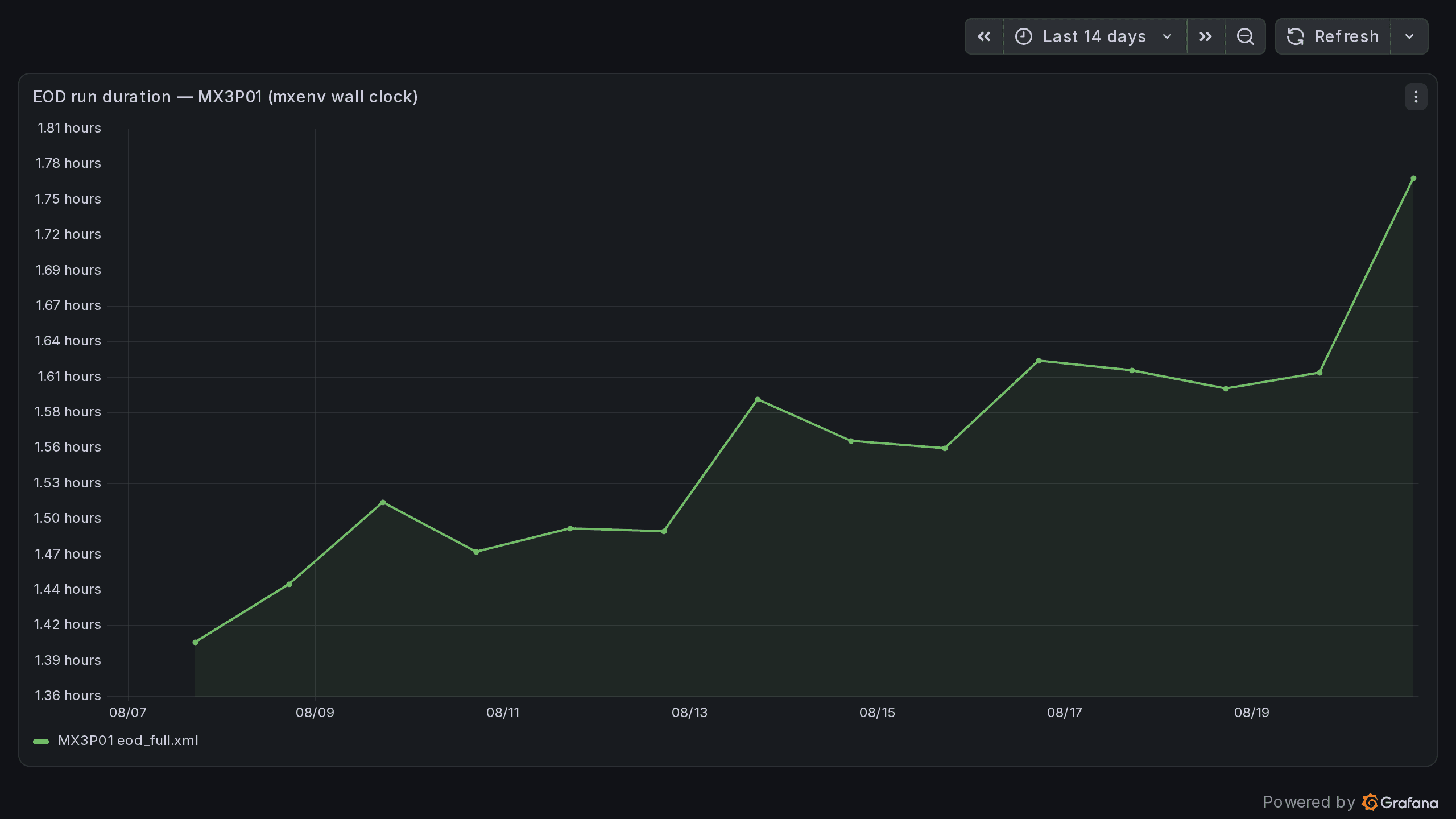
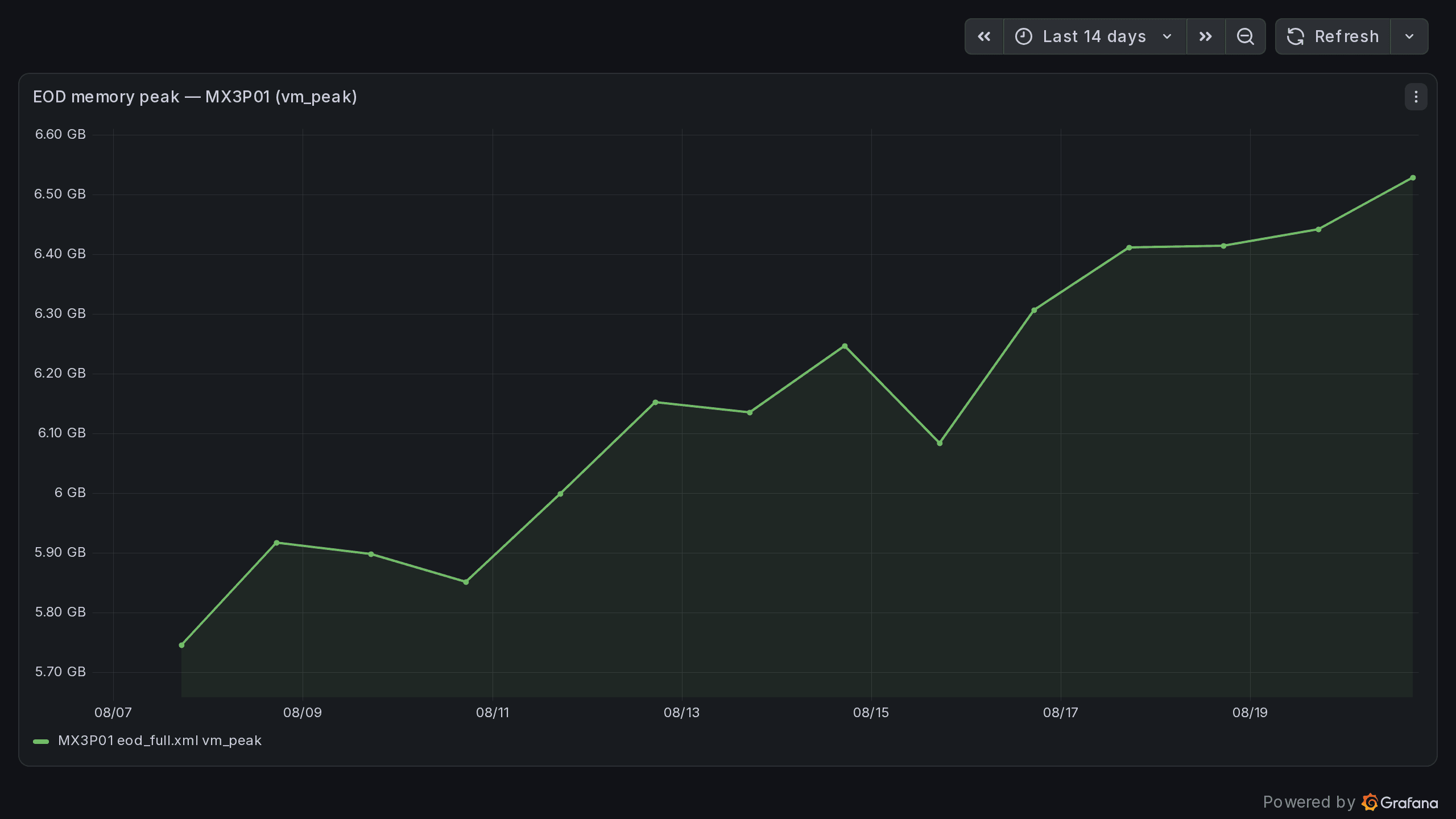
Read together, these two are the point: the curve climbs for days before anything fails. That is the difference between a maintenance window you schedule and a night you spend on the phone.
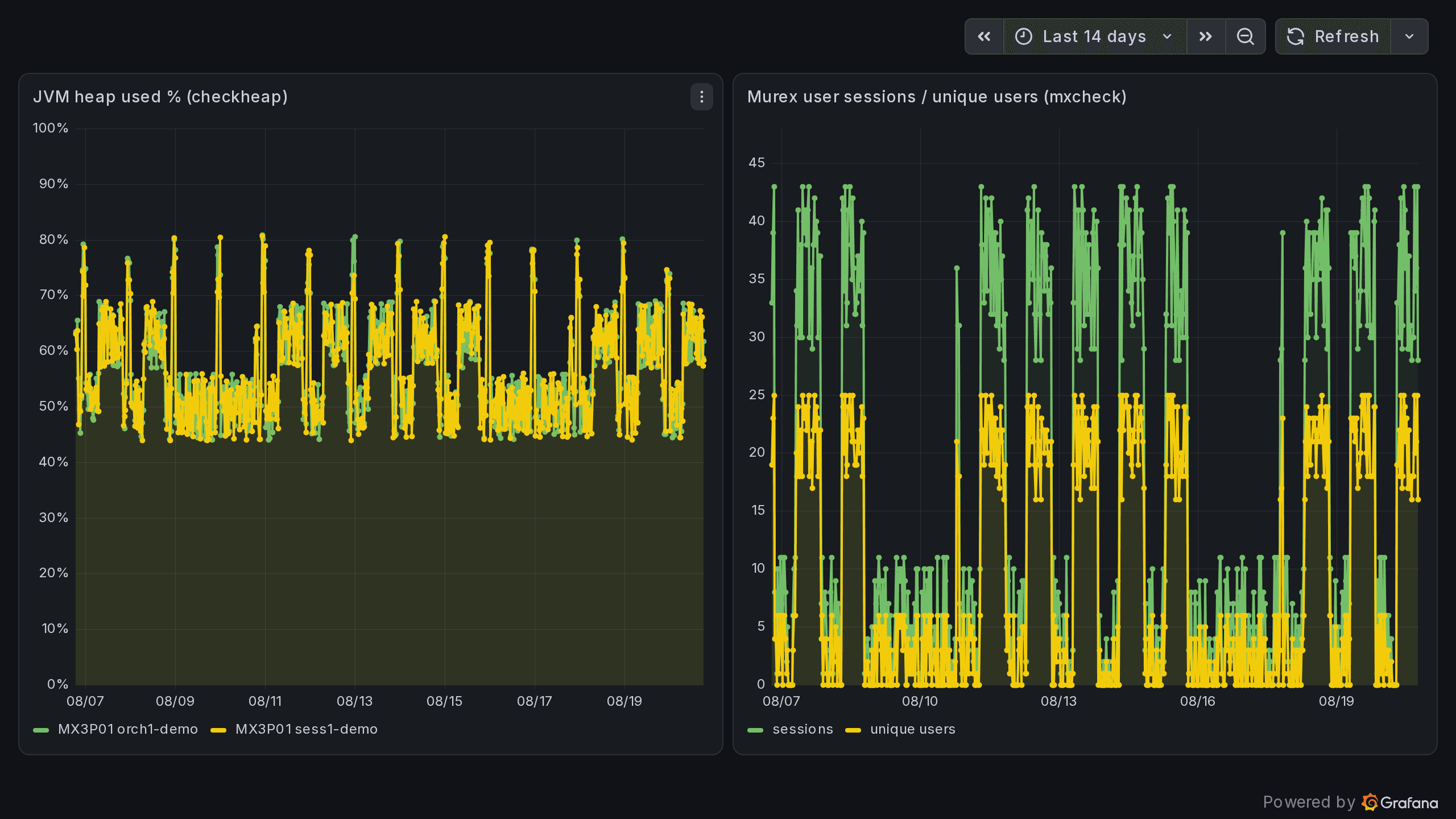
Telemetry never breaks a run
An unreachable receiver is a warning on stderr, never a failed job — the export is deliberately fail-open. And with no endpoint configured there is no network traffic at all: no phone-home, no default pointing outward.
Optional, for demos and evaluations
If you want to see it before you have an endpoint, a ready-made Prometheus and Grafana stack ships with it: its own playbook, its own services and ports, bound to localhost, removable without a trace. It neither replaces nor touches your existing monitoring. For air-gapped sites the artefacts can be staged in advance, with checksums pinned.
Security & compliance
Designed for banks that have to evidence every change.
Runs entirely on your infrastructure
MxENV3 is a single, statically compiled Go binary. No agents on the Murex hosts, no cloud service, no connection to us. It runs on your jump host or on the Murex hosts themselves and executes over the Ansible and SSH your platform team already uses. An optional central inventory server (TLS, token) stays inside your network.
Licensed per institution — no license server, no phone-home
Each delivered binary is built for your institution, with licence term and version compiled in. You always know what you run and until when. Nothing calls out of your network.
Secrets never leave your vault
MxENV3 stores no secrets. Passwords are referenced by name and resolved from your vault at apply time — the repository, the inventory and the rendered files never contain them in plaintext by design.
Provable, not just traceable
Configuration lives in Git: who changed what, when and why. On demand, MxENV3 compares the rendered configuration against the files actually deployed on the hosts and reports differences and missing files. That lets you prove to an auditor that the environment matches the repository, instead of asserting it.
If we disappear, your environments keep running
MxENV3 has no runtime dependency on us: no licence server, no phone-home, no cloud component. Your inventory is plain YAML in your Git, your rendered configuration is plain files on your hosts — both remain readable and usable without the binary. Source-code escrow with a European agent and a fallback licence can be arranged on request; we provide the documents for your third-party risk assessment.
Economics
The business case you can calculate yourself.
Four numbers decide it: engineer-days per environment build and refresh, multiplied by rebuilds per year; hours lost per incident caused by an undetected difference between PROD and UAT; test days lost while an environment is being repaired instead of used; and, in the cloud, the non-production compute paid for nights and weekends. We bring the calculation sheet to the technical session and fill it in with your figures. The licence is annual, per institution, and scales with the number of concurrently running environments.
FAQ
Questions Murex teams ask first
See MxENV3 on your own environments.
Send us an anonymised overview of your Murex environments, or just the number and versions. In a 45-minute session we show you the resulting inventory, the configuration matrix and a start plan. No access to your systems needed.
After that you can evaluate on a non-production environment yourself: it starts with commands that only read — configuration matrix, environment comparison, drift check against the deployed files. Nothing is written until you release it.
Both downloadable without a form — to forward to the business, security and procurement.